
TikTok added the photo-mode (slideshow) format in 2022, and saving one through the app gives you a video render with music baked on top — not the original images. If you want to download a TikTok slideshow the right way, you need the photos as separate files plus the song as an MP3. That is exactly what Snap3S does: paste the link and pick what you want, in original quality, with no watermark and no app install.
Just need the photos? Paste your TikTok photo-post URL into Snap3S and grab every image plus the audio in seconds. No app, no sign-up.
Download TikTok slideshow →What is a TikTok slideshow or photo post?
TikTok photo mode lets a creator upload up to 35 still images with a music track, displayed as a swipeable carousel. You will also see it called a "photo post", an "image post", or a "TikTok carousel" — they are all the same format. TikTok explains the format in its Photo Mode announcement.
Creators like it because photo posts get their own surface in the app and often reach a different audience than video. Re-uploaders like it because Instagram, Threads, and Pinterest all accept still images directly — but only if you can get the original photos out, which the in-app Save button will not give you.
Download a TikTok slideshow with Snap3S (3 steps)
The whole process takes about the same ten seconds as saving a normal video. The difference is what you get back: real image files, not a video.
- Open the photo post and tap Share → Copy Link.
- Paste the link into Snap3S on the home page.
- Choose your format on the result page: Download all photos (ZIP) for every image in original resolution, Download single image to grab one at a time, or Download audio (MP3) for the song by itself.
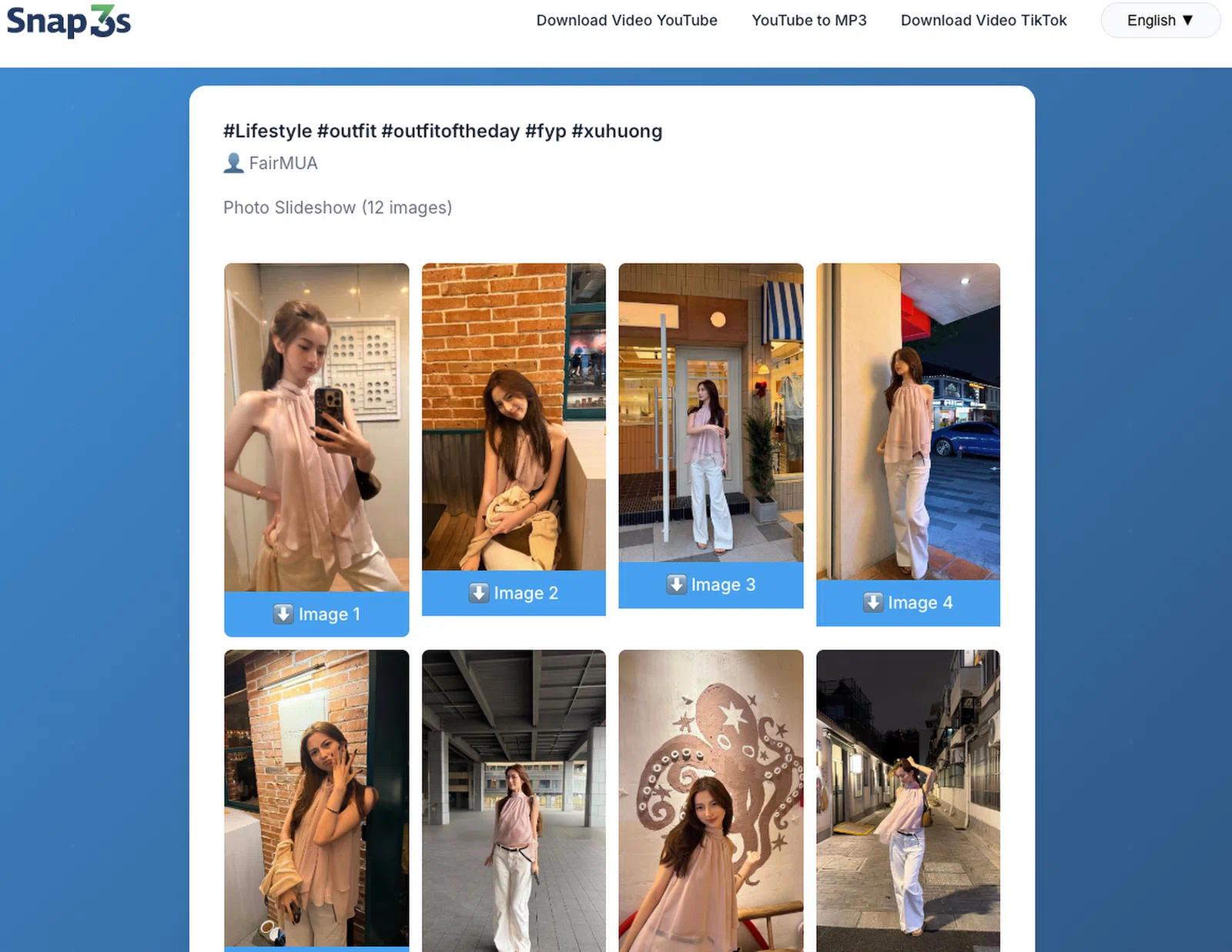
Every image comes down at the resolution the creator uploaded, with no re-compression and no logo stamped across it. If you have tried another downloader that flattened the whole thing into one video, this is the difference you were looking for.
Ready? Open the Snap3S TikTok downloader, paste your photo-post link, and pick "Download all photos". Your images are ready in seconds.
Download TikTok slideshow →Where do the downloaded photos go?
The photos arrive as a single ZIP file. Here is where it lands and how to open it on each device:
- iPhone (Safari): the ZIP saves to Files → On My iPhone → Downloads. Tap the ZIP to unzip it in place, then long-press each image and choose Save to Photos.
- Android (Chrome): the ZIP saves to your Downloads folder. Open it with any file manager — Google Files or Samsung My Files — to extract the images.
- PC or Mac: the ZIP saves to your Downloads folder. Double-click it to extract every photo.
If you have never opened a ZIP on your phone, do not worry — modern iOS and Android both handle it without extra software. Just tap the file and the images appear.
Save just the TikTok audio (MP3)
Sometimes you only want the sound — a viral track for a ringtone, a remix, or an overlay on your own footage. Snap3S can pull the audio from any photo post or video without saving the visuals at all.
- Paste the photo-post or video link into Snap3S.
- Choose Download audio (MP3) on the result page.
This works for regular video posts too, so it is the quickest way to grab a trending sound. If you want to turn that sound into a ringtone or pull music from other platforms, the same idea powers our YouTube to MP3 converter — paste, pick MP3, done.
Re-uploading TikTok slideshows to Instagram, Threads, and Reels
Getting the clean images is half the job. Here is how to re-post them without looking sloppy or getting flagged:
- Instagram caps carousels at 10 images. If the TikTok has more, pick your best 10 rather than splitting it across two posts.
- Add a credit caption like "Original: @creator on TikTok". It respects the creator's rights and cuts your risk of a takedown.
- Use the MP3 separately as an Instagram audio overlay if you want the original music on your carousel.
- Keep the original resolution. Do not re-compress or screenshot the images — upload the files straight from the ZIP.
- Do not re-save inside TikTok. Saving through the app adds the watermark back. Using Snap3S keeps every image clean.
Troubleshooting
- You got an MP4 instead of a ZIP. The post was a regular video, not a slideshow. Use the no-watermark guide for those instead.
- Only one photo in the ZIP. The creator uploaded a single image — that still counts as a "photo post" on TikTok, so nothing is missing.
- The ZIP will not open on iPhone. Update to iOS 13 or newer; older versions need a free unzip app from the App Store. On Android, any file manager opens it — our download TikTok on iPhone or Android guide covers where the Downloads folder lives on each phone.
Frequently asked questions
Short answers to the questions we hear most about TikTok photo posts. If yours is not here, paste a link into Snap3S and see the options for yourself.
Can I download a TikTok slideshow as separate images?
Yes. Snap3S delivers a ZIP file with each photo saved as its own JPEG, so you get every image individually rather than one merged video. Extract the ZIP and every picture is there in full quality.
Are the downloaded photos full quality?
Yes. Snap3S saves each image at the original resolution the creator uploaded, with no re-compression, no cropping, and no watermark added.
Can I download just the music from a TikTok slideshow?
Yes. After pasting the link, choose the Download audio (MP3) option to save the song on its own without any of the photos. It works for video posts too.
Does this work for regular video posts too?
Yes. If the link is a normal video rather than a photo post, Snap3S gives you a clean MP4 instead of a ZIP. You do not need to choose a different tool.
Is downloading a TikTok slideshow legal?
For personal use it is generally fine in most regions, but re-uploading needs the creator's permission and credit. See our full guide on whether it is legal to download YouTube and TikTok for the details.
Can I download a private slideshow?
No. Only public posts can be downloaded. Private and friends-only photo posts are blocked by TikTok's API, and Snap3S does not try to bypass that.
Try Snap3S now → Paste any TikTok photo-post URL and save every image plus the audio in original quality — no watermark, no app. Read the full legal guide before you re-upload.